



-
- iTransfer Platinum Mac

- iPhone Transfer Platinum Mac
- iPad Mate Platinum Mac

- PodWorks Platinum Mac
- iPhone Ringtone Maker Mac
- iPhone Transfer Plus Mac
- iPad Mate for Mac
- PodWorks for Mac
- iPhone Contacts Transfer Mac
- DVD to Video for Mac
- DVD to MP4 Converter for Mac
- DVD to iPhone Converter for Mac
- Blu-ray to Video Converter for Mac
- DVD to iPad Converter for Mac
- DVD to Audio Converter for Mac
- DVD Creator for Mac
- Video Converter for Mac
- MP4 Converter for Mac
- 3D Movie Converter Mac
- Video Editor 2 for Mac
- Audio Converter Pro Mac
- YouTube Video Converter for Mac
- Download YouTube Video for Mac
- YouTube HD Video Downloader Mac
- YouTube to iTunes Converter Mac

- YouTube to iPhone Converter Mac
- HEVC/H.265 Converter for Mac
- iTransfer Platinum Mac
- More
How to convert DVD movie to videos? 

I am looking for a simple software for me to take my home DVD collection to a format that I can store on a portable hard drive. I no longer have the space to store a large collection of DVDs so I want to store a copy on a hard drive. Can you make a suggestion of which products can help me to solve this issue? Thank you in advance.
Our recommended product - ImTOO DVD to Video Ultimate is the best one for you, especially DVD movie fans. It can convert DVD movie and music files to such video and audio formats as MPEG , AVI, DivX, XviD, MOV, WMV, MP4, MPEG-4, VOB, DAT, 3GP, 3G2, MP3, WMA, M4A, AAC, AC3, AU, OGG, MP2, etc. And editing function is available. Being a powerful and easy-to-use DVD converter and editor tool, the output quality and converting speed is perfect to comfort your needs. Don't hesitate any more, just Free Download ImTOO DVD to Video Ultimate and follow what we said below, your favorite DVD movies will be easily carried out on your iPod, iPhone, iPad or PSP, or any other portable media players!
How to convert DVD movie to videos?
Step 1: Download ImTOO DVD to Video Ultimate and install.
Step 2: Load DVD
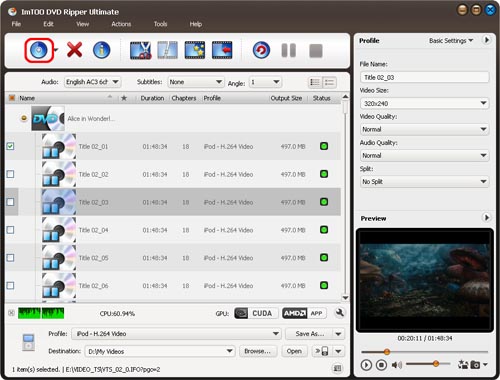
Run ImTOO DVD to Video Ultimate and Load your DVDs by clicking the "DVD" button on the interface or selecting the "Add DVD Folder" in the "File" menu.
Step 3: Select output format and output path
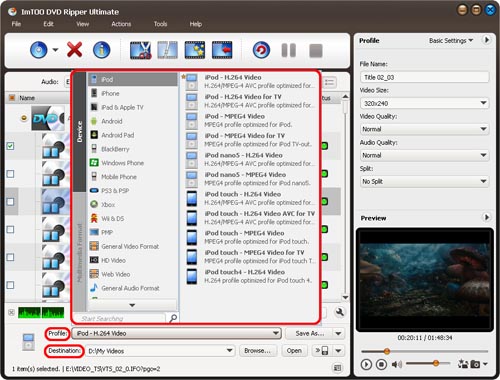
- Select output format: Select the files need to be converted and click "Profile" button to select the output format in the drop-down list.
- Set output path:
a. Save to computer: Click "Browse…" button to specify destination folder
b. Save to Device directly: Click "Output to Device"
Step 4: Extract file
After selected output profile, you only need to check the files you want to convert in the file list and click "Convert Checked Item(s)" button on the toolbar to complete the task.
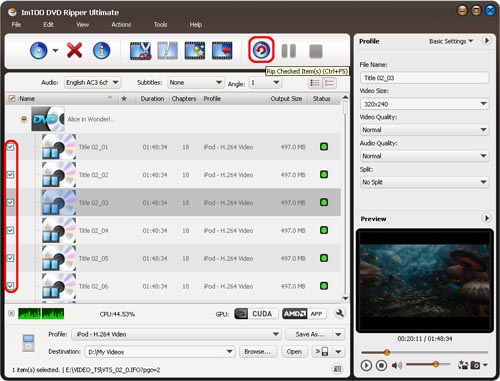
Ok, the above is the simplest function to converter DVD to videos. For more infromation, please visit this guide.
- You can upload your PSP video converted from DVD to your PSP player with the PSP video manager easily by clicking "PSP Video Manager" in the "Tools" menu.
- ImTOO DVD to Video Platinum also supports clip or segment conversion. You can convert any clip or segment by setting the start point and duration at will. The start point time format is hh:mm:ss, for example: 00:30:20. The duration time format is hh:mm:ss or s, for example: 00:00:40 or 40.
- You can set various output formats for different files as you like.
- You can set the preview window aspect by clicking "Preferences…" in the "Settings" menu.
- You may adjust the offset of the DVD's subtitles in the "DVD(Global)" tab which's a part of the "Preferences…" option.
- The operating language can be altered by clicking "Settings"⇒"Language" buttons.
Glossary:
- MPEG:
- The mainly used formats for videos are MPEG1 (also referred to as vcd), MPEG2 (used by DVD), MPEG (DVDIP
uses its variations as DivX, XviD, etc.)and MPEG4 AVC (very Hot now) - For audio format, MPEG Audio Layer 1/2, MPED Audio Layer3 (mp3), MPED-2 AAC, MPEG-4 AAC etc.
- The mainly used formats for videos are MPEG1 (also referred to as vcd), MPEG2 (used by DVD), MPEG (DVDIP
- H.264/AVC series:
- Its family includes H262, H263, H263+, H263++, H264(combination of MPEG AVC)
- Microsoft windows media series: (Well, big guy always has his own way of doing things~~)
- Its video format has MPEG-4 v1/v2/v3( based on MPEG4, DivX3), Windows Media Video 7/8/9/10
- Audio formats: Windows Media audio v1/v2/7/8/9
- AVI:
- Audio/viedo interleave, the most ubiquitous audio/video container format, which support the most audio and video
formats
- Audio/viedo interleave, the most ubiquitous audio/video container format, which support the most audio and video
- MPG:
- The audio/video container for MPEG,has a streaming attribute. It can be further classified into PS,TS, used
respectively as a container for DVD and HDTV.
- The audio/video container for MPEG,has a streaming attribute. It can be further classified into PS,TS, used
- VOB:
- The audio/video container format for DVD, supports multi-video ,multi-track, and multi-title etc.
- MP4:
- The audio/video container format for MPEG-4,based on QuickTime MOV ,and features many superiorities.
- 3GP:
- 3GPP uses 3GP as a video format to transmit streaming media.
- ASF:
- Windows Media applies ASF as its audio/video container ,to be used for transmitting streams, script included.
- WAV:
- A kind of audio container. People often refer to WAV as the unzipped PCM code, but as a matter of fact, WAV
also includes other ACM zipping codes such as MP3.
- A kind of audio container. People often refer to WAV as the unzipped PCM code, but as a matter of fact, WAV
- MP3:
- MPEG Audio Layer 3 ,as has been mentioned above.